Seeing every form in one list
Enquiries aren't the only thing arriving from your website. People fill in custom forms, partners send referrals, patients sign consent forms and answer pre-consultation questions. Each of those used to live on its own page.
The Enquiries page now gathers all of it. Along the top you'll find:
| Tab | What's in it |
|---|---|
| All | Everything, newest first — enquiries and all four form types together. |
| Enquiries | Just the enquiry list, exactly as before. |
| Custom Forms | Submissions from your website forms. |
| Consent Forms | Consent forms sent out, and whether they're signed. |
| Referrals | Referrals sent in by partner clinics. |
| Pre-consultation | Pre-consultation forms and their answers. |
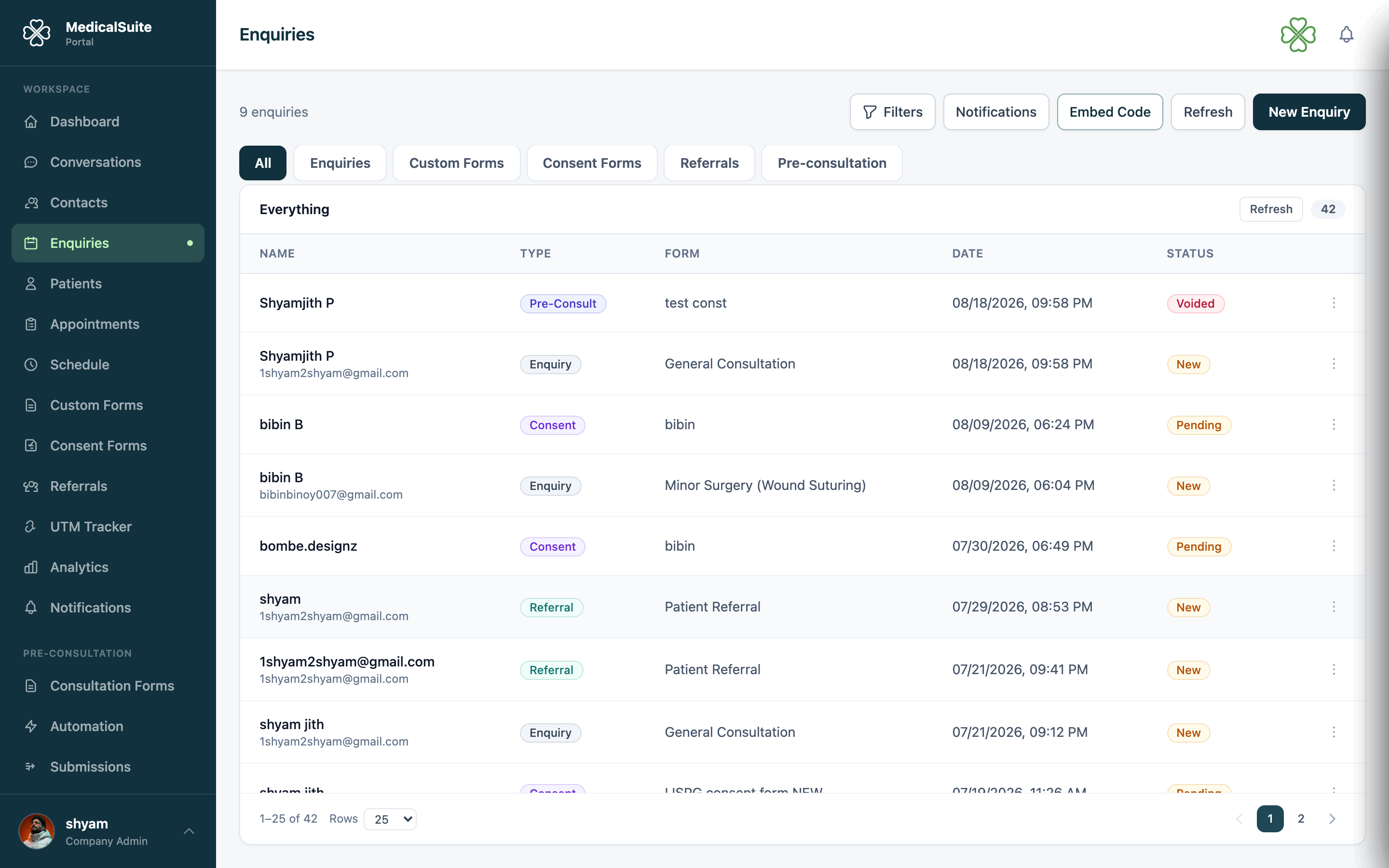
A tab only appears if your clinic uses that feature and your role can view it.
Reading the list
Every row shows the same five things, whatever kind of record it is:
- Name — who it's about. For a referral this is the partner who sent it, not the patient.
- Type — a coloured label: Enquiry, Custom Form, Consent, Referral, Pre-consult.
- Form — which form produced it (for enquiries, the treatment asked about).
- Date — when it arrived.
- Status — where it's up to. Amber means someone still needs to act: New, Pending, Reviewing. Green means done: Completed, Accepted, Scheduled. Custom form submissions have no status, so they show a dash.
The column headings stay in place as you scroll, and you can set how many rows to show — see Working with lists.
Opening a record
Click any row.
- Enquiry rows open the usual enquiry details panel, with status, follow-up and comments.
- Everything else opens a panel showing the answers as the person typed them, with the same buttons as the row's ⋯ menu.
What you can do to each type
Use the ⋯ menu at the end of a row. You only see an action if your role allows it.
| Type | Actions |
|---|---|
| Enquiry | Open · Edit · Schedule · Cancel · Delete — identical to the Enquiries tab |
| Custom Form | View · Open form editor · Delete. Answers themselves can't be edited |
| Consent | View · Open form editor · Signed PDF · Copy signing link · Sign in office · Void · Delete |
| Referral | View · Open form editor · Signed PDF · Delete. To change a referral's status, use the Referrals tab |
| Pre-consultation | View · Open form editor · Download PDF · Copy fill link · Regenerate PDF · Void · Delete |
Open form editor takes you straight to the builder for the form that produced this submission — the quickest fix when an answer shows a question is confusing or a field is missing. Editing a form never changes submissions already received; they keep the wording that was on screen when the person filled it in.
The Referrals tab is the full referrals screen — search, status filters, status editing with a note, supporting documents, delete. It's the same view as the Referrals page.
Actions that can't be undone — voiding a consent request, deleting any submission — ask you to confirm first.
Void and Delete do different jobs:
- Void stops the person's link working, but the record stays in the list marked voided. Use it when a form was sent by mistake or is no longer needed.
- Delete removes the record from every list, count and tracking page. Use it for spam, duplicates and test entries. Deleting needs the delete permission for that feature, so most roles won't see it — see Deleting records.
Anything you change refreshes the list straight away, so counts and statuses stay correct across the tabs.
Common questions
A custom form row shows a strange name. Custom forms have no fixed name field, so the list shows the first answer on the form. If your form starts with something other than a name, that's what appears. Move the name field to the top of the form to fix it.
The Consent tab shows "—" instead of a patient name. Consent forms are attached to patient records. If the patient record has since been removed, there's no name left to show.
Why is my newest submission missing? The list loads when you open the page. Click Refresh above the table to pull in anything that arrived since.
Why can't I see Delete on a row? Deleting is permission-controlled per feature — custom forms, consent, referrals and pre-consultation each have their own. If your role doesn't have it for that feature, the action simply isn't in the menu. Ask your administrator.
Can I get a deleted submission back? Not from the portal. Deleting is meant for records that should never have existed, so confirm carefully — use Void instead when you only want to stop someone filling a form in.
I voided something by mistake. Voiding can't be reversed. Send the person a fresh form instead: consent forms from the patient's record, pre-consultation forms from the enquiry or patient.